Free DownloadWhat is wireless communications? Everything you need to know
Wireless communications are central to enterprise networks. This comprehensive guide explains how key wireless features evolved, how it's used in different types of networks, the benefits and challenges of the technology and where the wireless industry is headed.
Troubleshoot wireless network connection problems in 10 steps
When troubleshooting wireless network issues, several scenarios can emerge. But valuable end-user insights can help network administrators root out problems.
Wireless networking is both pervasive and getting more complicated behind the scenes. For end users, Wi-Fi is the invisible network resource they connect to. For wireless network administrators -- who design, deploy and support the wireless LAN -- the Wi-Fi network is a fairly complicated beast with many moving pieces that are part of the bigger networking environment.
When wireless connection problems occur, how end users and administrators respond depends on various factors. In this article, we consider 10 common steps for troubleshooting and exonerating the wireless network on the way to finding the source of trouble.
Step 1. Turn it on and point it in the right direction
Sometimes, the most obvious causes of system trouble can be the hardest to see. All of us make faulty assumptions at times. When we try to access the Wi-Fi network and nothing happens, it's best to start with the basics. In that case, follow these fundamental steps:
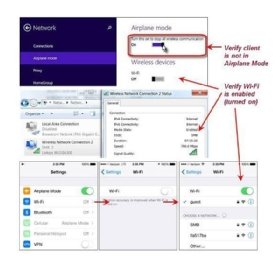
Regardless of what mobile device you are using, verify that the wireless network adapter is toggled on.
Make sure your device is not in airplane mode, as that is a functional block to seeing a wireless signal.
Verify that your Wi-Fi client adapter is turned on and you're not in airplane mode.
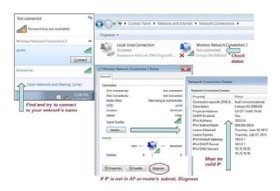
Ensure you are not configured for a static IP address, which is usually a special-case configuration.
Many wireless LAN (WLAN) environments have multiple service set identifiers, or network names, and not all of them lead to where you want to go. When your Wi-Fi is enabled and you show a connection but can't get an internet connection, check to make sure you are connected to the right network for your particular role. Some wireless networks are special-purpose dead ends that don't reach the internet.
Depending on what network you are connecting to, you may need coordinated permission to use the Wi-Fi. If you skip this step, the wireless network can certainly feel broken.
Step 2. Define the scale of the problem
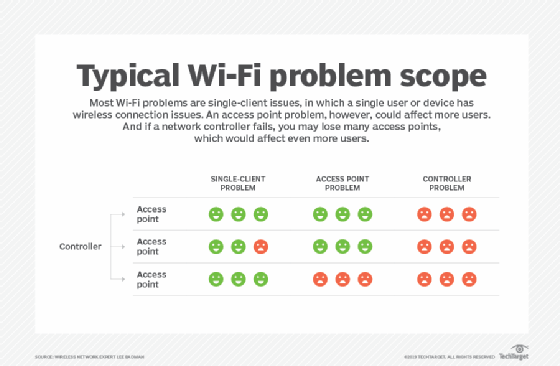
The majority of Wi-Fi problems are single-client issues -- as long as the network was designed and installed by qualified professionals. At the same time, even market-leading vendors can deliver buggy code, and good components occasionally do fail.
When you encounter wireless network performance issues, you need to understand how far the problem stretches. This step applies whether you run the network or just use it. When experiencing wireless connection problems, end users can gauge the scope of the issue by following these steps:
Take a deep breath before you start calling the entire wireless environment bad. If you are the only one having wireless connection problems in a room full of people, then that is telling.
Do you have a comparative device? For instance, can you connect with your laptop but not your smartphone? Can you compare your situation with someone nearby?
If you conclude the issue is with a single device, user or password, then you may need help desk assistance to get configured correctly.
All client devices and individual user accounts can have issues. Whether you're a C-level employee or your device is a top-end Apple product, everyone eventually experiences wireless connection problems.
If multiple users are having issues, the more details you can provide to IT, the faster the resolution will be.
Finding the scope and scale of your wireless connection problems
Step 3. Sleuth basic diagnostics
When your wireless connection fails, it can be unnerving, especially when you're trying to do actual work. Laptops, tablets and smartphones can show and tell you basic diagnostic information. But you have to know what you're looking at. Don't jump to conclusions based on scant information. When troubleshooting wireless connection problems, consider these diagnostic steps:
Signal bars are perhaps the most basic and universal indicator of wireless signal strength. When wireless network connectivity is in question, we probably all take a look at the bars. If the bars are not present or too weak, then that's good information -- but it may not tell the whole story. Unfortunately, the algorithms behind signal bar indications vary across devices, and your "strong" signal may seem only mediocre on my device, even when we are in the same location.
Some client devices are especially poor at roaming, which is the process of leaving one cell for a stronger or better one. Roaming is mostly all client-controlled, subject to however the wireless adapter driver code was written. This is not spelled out in the 11 standard, so vendors have flexibility to put their own spin on roaming. If my device doesn't roam well, my weak signal can be poor device performance on a perfectly healthy network.
How do you know what speed you should get on a particular WLAN? That's a tough question, with many variables depending on device model, network hardware and even internet service provider speed. Generally, no one cares as long as things are running well. But, when trouble hits, this is another area of great variability across client devices and specific locations covered by the wireless network.
Ping with caution. One of the most universal network troubleshooting steps is to ping a destination. This tells you whether the target device is alive, the network path between source and destination is good in both directions, and how long it took to get a response. But ping may fail for several reasons -- from host-based firewall settings to filtering along the way. Use ping, but know it's not absolute.
Verify the wireless client's TCP/IP settings.
DNS problems can be tricky. What if I try to reach www.techtarget.com, and it fails? Is the Wi-Fi broken? Maybe not. DNS translates the TechTarget server name to and from its IP address. If I put the IP address in the browser and get to the site, we have a DNS issue. Basic DNS tests are easy, and they tell a lot when troubleshooting. Include your DNS findings in any trouble ticket. This service may be provided locally or from an internet service provider.
Most well-run networks have everything labeled in some fashion. If you are reporting trouble and have an access point (AP) within sight, try to note how it's labeled and what color LEDs are visible on it. Every bit of input helps for troubleshooting wireless connection problems.
Step 4. Report trouble with good information
Outside of the smallest business environments, a business WLAN typically has several components that help you get on the network and keep you connected. The fastest resolution will come with good information relayed to support staff, whether it's a formal help desk or just the IT person who deals with problems. The following information and questions are important when troubleshooting wireless connection problems:
Where did the problem occur? Within a given room? If applicable, did the trouble follow you to a different room, floor or building?
If you have multiple devices, did they all have problems? If not, which devices worked, and which did not? If they all failed, did the failure feel the same?
What time and date did the issue happen? Nothing is harder to troubleshoot than, "Last week sometime, I had an issue on the network." Every hour of network operation equals thousands of lines of logs to parse. Good timestamps help immensely.
Get a meaningful description of what was experienced. Was the wireless network visible? Could you connect but get nowhere or not connect at all?
Did you get an IP address? Was any DNS testing done?
If on a smartphone, did you toggle between Wi-Fi and cellular to see if one network behaved while the other did not?
There's no such thing as too much information when reporting network troubles. Just try to be specific.
There's no such thing as too much information when reporting network troubles. Just try to be specific.
Step 5. Untangle advanced client issues
When everything seems to be configured correctly but a certain device just won't behave, it's time to dig deeper on the device. At this point, one classic mistake is to start adjusting settings on the network to try to "fix" a problematic client device. Leave the network alone, or you'll likely cause bigger issues. Watch out for these following items, and expect all of these to be scrutinized if a help desk is involved:
Unfortunately, drivers can still wreak havoc on whether a Windows machine will perform well on Wi-Fi. Even with Windows updates turned on, most hardware drivers do not automatically refresh. Check the drivers for your wireless adapter, BIOS and chipset for freshness. All three can cause problems.
If you are connecting to a secure enterprise WLAN, something as simple as time and date inaccuracies can prevent wireless authentication. Make sure yours are right.
Secure enterprise networks are far more complicated than simply using a password or pre-share key. Several settings may have to be configured, and even a certificate loaded on your client device, before you can connect. Business networks are frequently concerned with authentication, strong encryption and logging details of every connection for auditing and troubleshooting purposes. This greatly increases the complexity of getting individual client devices onboarded. See if your network administrators provide a configuration tool or written instructions on getting configured, or you'll likely stay disconnected from the network.
User credentials can also be a problem -- especially if your network requires occasional changes to passwords. Make sure your Caps Lock is not on and you know your password before attempting to connect.
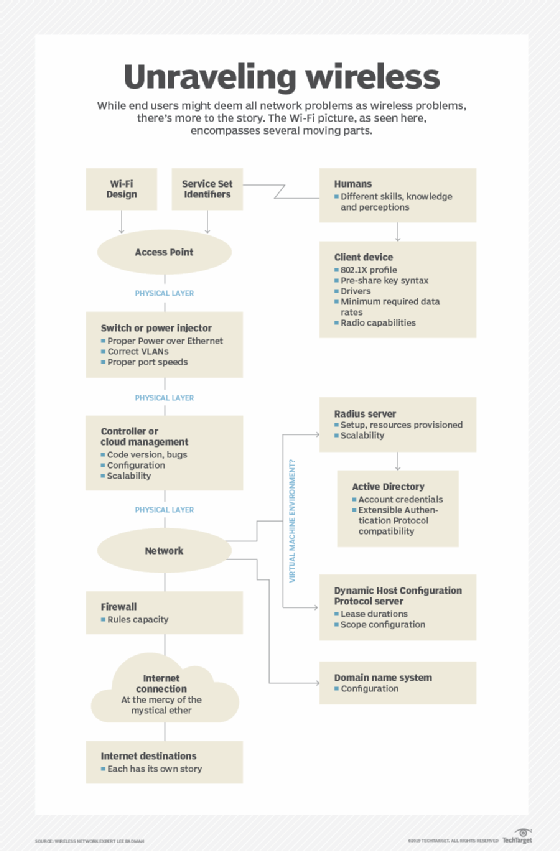
As this diagram shows, wireless connection problems can originate from several different areas.
Step 6. Understand infrastructure failure points
Most of the WLAN infrastructure is a mystery to Wi-Fi clients, but there is value in understanding some common high-level failure points on the infrastructure side. In well-administered network environments, most of the following should be monitored closely with various automated tools. As mentioned earlier, most Wi-Fi problems tend to be single-user in nature, but those mentioned here will generally be felt by multiple clients.
Wireless APs stop working for various reasons. They may experience component failure, firmware corruption or physical damage. Perhaps the cable connecting the AP to its network switch gets compromised, or the upstream switch port has issues. In a perfect world, there is redundancy among APs, and losing one isn't noticed by end users. But not all environments are perfect.
If a wireless environment is underbuilt, APs may get overwhelmed by high client counts or just a few clients doing high-bandwidth applications. Either way, if you are on a congested AP, you may get a strong wireless signal but unusable speed.
If a switch that powers multiple APs has problems, then the chance of an area-wide or building-wide outage becomes likely.
Many APs are akin to business telephones because they get their intelligence from a network-connected component called a controller. When a controller fails, you may lose dozens, hundreds or even thousands of APs -- this is every engineer's nightmare.
For more on Wireless Communications, read the following articles:
Step 7. Quantify application and destination issues
What if you're successfully connected to Wi-Fi but can't get a specific application to work? Or you try to reach a web destination, but you get an error page? Usually, these situations have nothing to do with Wi-Fi. Generally, other network conditions are to blame.
When you hit a roadblock, try to quantify what is working right and what is failing. Problems this specific will only be the fault of the WLAN if some specific protocol or destination is blocked in a firewall setting. The APs and radio frequency environment will have nothing to do with this sort of situation, but the information you gather will help administrators troubleshoot what's going on.
Step 8. Squish code bugs
Unfortunately, in today's business wireless networks -- despite high prices and promises of cutting-edge innovation -- the logic under the hood is often buggy. Several modern AI-driven analytics dashboards are available, but none of them can tell you that code bugs are hitting your Wi-Fi environment. So, we live with this problem, and surprisingly, market-leading systems can be the worst offenders.
Although network administrators are responsible for resolving code bugs, end users often feel the effects. Whether in the form of a memory leak or an intermittent malfunction, code bugs can be the absolute worst thing to hit a wireless network. Here are some of the symptoms of code bugs:
spontaneous reboot of multiple APs, from a few to thousands;
APs that stop allowing client access;
specific features that stop working;
some common subset of client devices that all have the same issue, while others are fine; and
erratic network behavior for Wi-Fi clients or APs.
Code bugs often require a support ticket to be opened with the WLAN vendor. There can be a great deal of tension here. The network engineering team wants a fast resolution. Network users are affected, and organizational tech execs are looking for accountability, while the vendor grapples with a convoluted troubleshooting algorithm.
Meanwhile, features may be disabled, but the end result is usually a code upgrade. When dealing with code bugs, communicate with users and upper management. Tell them what is happening: The network itself is fine, but the code running it is problematic.
Step 9. Run a tight ship
Today's wireless networks are often extremely complicated and integrated with a growing number of parts of the larger network environment. Tools, training, documentation and monitoring are all key components as an effective response when trouble hits. The team supporting your wireless environments should have wireless-specific skills and the right software and test equipment to cut through the fog when responding to problems.
Good network diagrams, well-labeled cables, APs, switches and up-to-date call lists can resolve problems quicker. Staff need occasional training, and your tools need to be refreshed periodically. It takes time to label everything and keep the diagrams accurate. But all of this is an investment at troubleshooting time.
It takes time to label everything and keep the diagrams accurate. But all of this is an investment at troubleshooting time.
Step 10. Consider the home vs. work divide
Never before has there been such an amazing breadth of wireless client devices. From smart home gadgetry to wireless printers to Wi-Fi-enabled lab instrumentation, there is a fascinating array of stuff that wants to find its way to the business WLAN environment.
But there are also real gaps between what the big, expensive corporate Wi-Fi network can support versus your home wireless router. Many devices that we love at home just don't fit well at work for several reasons:
Lack of enterprise security features. Wireless printers and projectors are notorious for lacking 802.1X support, which relegates them to perpetual one-off status in many corporate Wi-Fi environments.
Oddball requirements. Some personal mobile devices lack enterprise security support and require living room-style multicasting and discovery mechanisms that don't mesh well with larger, more complex environments.
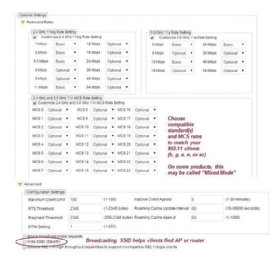
With so many data rate options, mismatches between client and access points are fairly common.
Competing infrastructure. Some client devices come with their own Wi-Fi AP that is required to form whatever system is in play. These poorly conceived components -- lighting controllers, for example -- interfere with the business Wi-Fi network, lack security controls and frequently imperil the LAN to which they connect.
Incompatible data rates. At home, it's common to stretch the signal from a wireless router as far as it can go. This is done with high power and low data rates that enable cells to stretch farther with lower performance at the edges. Some client devices require those low data rates, but it's common to disable these slower rates and shrink the cells at work, where capacity is more important than simple coverage.
In spite of these potential wireless connection problems, most well-run IT groups have an established WLAN policy that guides security, ensures performance baselines and keeps users from going rogue with incompatible hardware brought into the workplace.
Wireless troubleshooting best practices
When troubleshooting the WLAN, end users and IT can follow some best practices.
End user. As the person experiencing the problem, you are an important link in the troubleshooting chain. It's not enough to simply complain, wash your hands of the issue and expect a speedy resolution. The fix may be on your device -- and not on the network. For the most expedient return to functionality, you need to provide good information and stay engaged throughout the response process. Expect questions from the help desk and system administrators, and recognize that your cooperation is needed.
Help desk. If you or your group responds to trouble reports, make sure to ask good, nuanced questions. Remember that end users often have limited technical knowledge. Therefore, patience and perseverance are required as you help them give you the information you need. Don't kick the response can down the road by escalating trouble reports that haven't been screened for obvious problems first. Your system admins and engineers probably have higher-priority work to do than ask the questions you should have. Templates can help, but if you rely on them too much, they can also reduce your own efficiency and nimbleness.
System administrators and engineers. At this level, act on information provided by end users and help desk personnel. Find answers by combining that information with live observations of the WLAN system and by poring through log data. This is no place for gratuitous changes of network settings and hoping for the best, as that creates more issues than it solves. After exhausting all options on the most complex issues, invoke vendor technical support. Also, recognize that the buck stops with you, and communicate back down to the help desk and end users as you expect them to share information with you.